Question
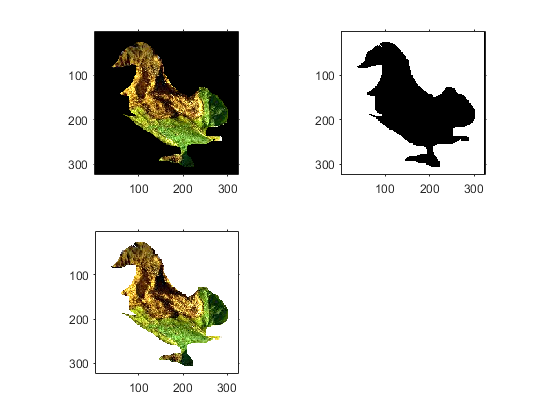
rgbImage=imread('C:\Users\KeerthiDev\Desktop\tomato_dataset\Tomato_late_blight_water_mold\late130.jpg'); %figure,imshow(rgbImage, []); rgbImage = imadjust(rgbImage,stretchlim(rgbImage),[]); rgbImage = imreducehaze(rgbImage); figure,imshow(rgbImage); grayImage = rgb2gray(rgbImage); figure,imshow(grayImage, []); hFH = imfreehand(); binaryImage = hFH.createMask(); xy = hFH.getPosition; blackMaskedImage = grayImage; blackMaskedImage(~binaryImage) = 0; maskedRgbImage = bsxfun(@times,rgbImage,cast(binaryImage, 'like',rgbImage)); figure,imshow(maskedRgbImage); after runing this code to i got the image as shown below I want to only change this black background to white color (without any other change.)
Expert Answer

John Michell
PhD Expert
Answered Sep 13, 2026
Try this code:
rgbImage = imread('image.webp');
subplot(2, 2, 1);
imshow(rgbImage);

mask = all(rgbImage == 0, 3);
% Take the largest blob
mask = bwareafilt(mask, 1);
subplot(2, 2, 2);
imshow(mask);

maskedRgbImage = rgbImage + uint8(255 * repmat(mask, [1, 1, 3]));
subplot(2, 2, 3);
imshow(maskedRgbImage);
100% Run Guarantee
3-Hour Fast-Track Delivery
Need a Custom Version or Complete Simulation for This Problem?
Our 500+ PhD engineers build, debug, and optimize working MATLAB scripts and Simulink (.slx) models tailored to your exact assignment rubrics with zero plagiarism.
Tested on MATLAB R2024b / R2026a
Turnitin 0% Plagiarism Report
Free 7-Day Revisions Guarantee
Have a different question? Ask here
Related matlab Questions & Solutions
Browse All →
Explore similar technical troubleshooting questions and verified MATLAB solutions:
Ready-to-Run MATLAB & Simulink Projects
Browse All Projects →