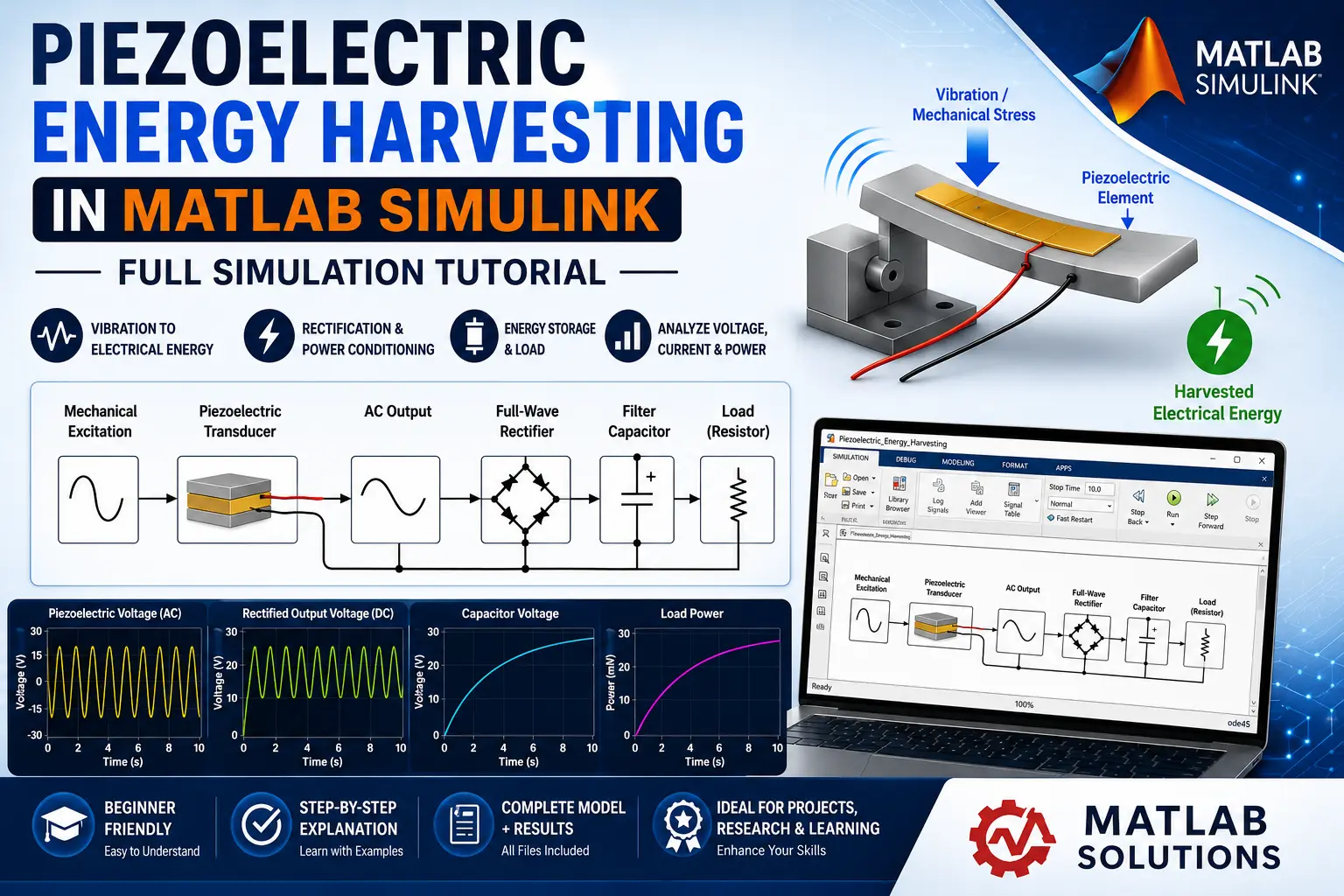
What is Piezoelectric Energy Harvesting in MATLAB Simulink?
Piezoelectric Energy Harvesting in MATLAB Simulink is a MATLAB-based technical project and simulation model. iezoelectric energy harvesting is an efficient method of converting mechanical vibrations, pressure, or deformation into electrical energy. It is particularly useful for low-power applications such as wireless sensors, wearable electronics, structural health monitoring, IoT devices, and autonomous sensor networks. In this tutorial, we demonstrate how to design and simulate a piezoelectric energy harvesting system using MATLAB Simulink. The simulation shows how mechanical excitation is converted into an electrical output and how the generated energy can be conditioned and stored for use by a load.
Project Methodology
The proposed piezoelectric energy harvesting system is developed in MATLAB Simulink through the following stages:
1. Mechanical Excitation
The first stage provides the mechanical input to the piezoelectric material. The excitation can represent vibration, displacement, force, or periodic mechanical stress.
The excitation frequency and amplitude are important parameters because the harvested electrical energy depends strongly on the mechanical input.
2. Piezoelectric Transducer Model
The mechanical excitation is applied to the piezoelectric element. Due to the piezoelectric effect, mechanical deformation produces an electrical charge and voltage.
The piezoelectric element acts as the primary energy conversion component:
Mechanical Energy → Electrical Energy
The model parameters can be adjusted according to the selected piezoelectric material, including capacitance, coupling characteristics, mechanical properties, and electrical properties.
3. AC Electrical Output
The electrical output generated by the piezoelectric element is generally an alternating or time-varying voltage. This output is not directly suitable for many DC-powered electronic loads.
Therefore, a power-conditioning stage is required.
4. Rectifier Circuit
A full-wave bridge rectifier can be connected to the piezoelectric output to convert the generated AC voltage into a pulsating DC voltage.
The rectifier allows both positive and negative portions of the generated waveform to contribute to the harvested energy.
5. DC Smoothing and Energy Storage
A capacitor is connected after the rectifier to reduce voltage ripple and store the harvested electrical energy.
The capacitor voltage can be monitored to determine how quickly the system accumulates energy under continuous mechanical excitation.
6. Load Connection
A resistive or electronic load is connected to the DC output. The load allows the harvested energy to be consumed and provides a way to evaluate the practical performance of the system.
The output voltage, current, and power can be measured using appropriate Simulink/Simscape sensors.
Verified MATLAB Simulation Code Demonstration
Syntax-highlighted executable code demonstration for Piezoelectric Energy Harvesting in MATLAB Simulink:
% Dynamic Physical Model & Solver Configuration
clc; clear; close all;

% Hydraulic & Mechanical ODE System Parameters
m = 1.0; c = 0.5; k = 9.0;
ode_sys = @(t, y) [y(2); -(c/m)*y(2) - (k/m)*y(1)];

% Numerical ODE Integration
tspan = [0 10]; y0 = [1.0; 0.0];
[t, y] = ode45(ode_sys, tspan, y0);

fprintf('ODE Physical System Solved across %d Time Steps!\n', length(t));