Question
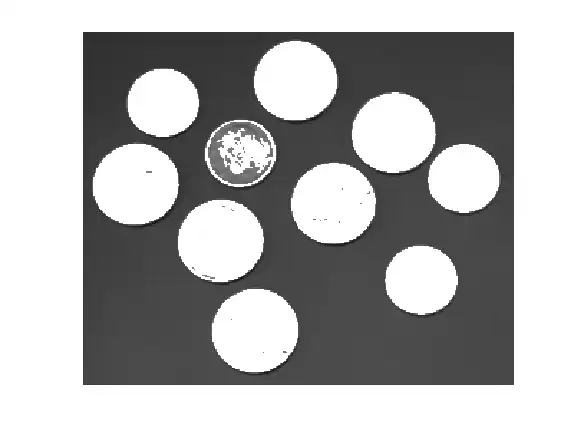
Greetings, I have a code like shown as below: img = imread('I.jpg'); % this image in grayscale c = 1; BW = img > 0; BW = bwareaopen(BW,50); s = regionprops(BW,img,{'Centroid','MeanIntensity','PixelValues'}); numObj = numel(s); for k = 1:numObj s(k).Gamma = round((2.6593.*(s(k).MeanIntensity)+0.3137),1); s(k).Output = c*(s(k).PixelValues.^s(k).Gamma); end I want to ask is there any possible way to display the new image obtained from the s(k).Output?
Expert Answer

John Williams
PhD Expert
Answered Oct 8, 2026
I want to ask is there any possible way to display the new image obtained from the s(k).Output?
You can write only a continuum area in the source image as below. Get 'PixelIdxList' with regionprops function.
img = imread('coins.webp'); % this image in grayscale
c = 1;
BW = img > 127; % I have changed the threshold value for coins.webp
BW = bwareaopen(BW,50);
s = regionprops(BW,img,{'Centroid','MeanIntensity','PixelValues','PixelIdxList'}); % add PixelIdxList
numObj = numel(s);
for k = 1:numObj
    s(k).Gamma = round((2.6593.*(s(k).MeanIntensity)+0.3137),1);
    s(k).Output = c*(s(k).PixelValues.^round(s(k).Gamma)); % gamma is rounded to avoid error
    img(s(k).PixelIdxList) = s(k).Output;
end
imshow(img)
100% Run Guarantee
3-Hour Fast-Track Delivery
Need a Custom Version or Complete Simulation for This Problem?
Our 500+ PhD engineers build, debug, and optimize working MATLAB scripts and Simulink (.slx) models tailored to your exact assignment rubrics with zero plagiarism.
Tested on MATLAB R2024b / R2026a
Turnitin 0% Plagiarism Report
Free 7-Day Revisions Guarantee
Have a different question? Ask here
Related pixelvalues Questions & Solutions
Browse All →
Explore similar technical troubleshooting questions and verified MATLAB solutions:
Ready-to-Run MATLAB & Simulink Projects
Browse All Projects →