Question
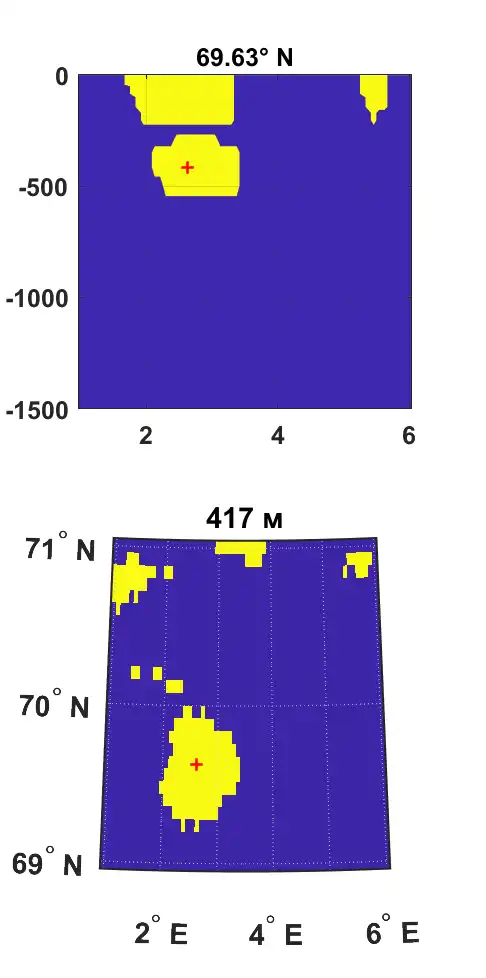
I have a 3D logical array where is several spatial areas marked as "true" or "1". 1st dimension is latitude, 2nd – longitude, 3d – depth. I need to choose only one area which contains a preassigned point in space. This point is always inside one of the areas. As a result, I should get the similar logical array, which has only one area with values "1". I think the first problem is to find the border for each area. I tried to use "alphaShape" for it but I’m not sure that I actually need it. Besides, I had a problem with it because my areas stick together into one. I have added a data file in the hope that it will make my question clearer. shp = alphaShape(lon3(mask), lat3(mask), z3(mask), 1); plot(shp) % lat3, lon3, z3 - 3d array of latitudes, longitudes and depths % mask - logical 3d array with several spatial areas % core_lat, core_lon, core_z - coordinates of preassigned point (red cross % in picture) (in data) An example of data is shown in the figure below. The figure above shows a vertical section along the latitude of 69.63 N, the figure below shows the distribution at the depth of 417 meters. Yellow is several areas, from which I need to select one. Red cross is preassigned point.
Expert Answer

Neeta Dsouza
PhD Expert
Answered Oct 4, 2026
The demo uses an image from the Image Processing Toolbox. You can replace the mask variable with your binary matrix and define the target with your (x,y) target value.
Generate inputs
- mask is a 2D binary matrix (true|false values)
- target is the (x,y) coordinates of the target that lies within one of the objects in the image.
RGB = imread('pillsetc.webp'); % image processing toolbox
mask = imbinarize(rgb2gray(RGB));
target = [430,170];
Find object closest to the target
- The closest true pixel in the image to the target is identified using pdist2.
- Each group of true values in the binary image is assigned a group number using bwlabel.
- The group number that belongs to the group closest to the target is stored in targetGroup.
- All other groups of true values in the binary matrix are removed.
[rownum, colnum] = find(mask);
[~,I] = pdist2([colnum,rownum],target,'cityblock','smallest',1);

maskLbl = bwlabel(mask);
targetGroup = maskLbl(rownum(I),colnum(I));

maskClean = mask;
maskClean(maskLbl ~= targetGroup) = false;
Plot results
The original image and the cleaned image are plotted along with the target location (x) and the closest true pixel (o).
figure()
tiledlayout(1,2)
nexttile
imagesc(mask)
colormap(parula(2))
hold on
plot(target(1), target(2), 'rx', 'DisplayName', 'target')
plot(colnum(I),rownum(I), 'ro', 'DisplayName', 'Nearest true value')
title('full binary image')
axis tight
axis equal

nexttile
imagesc(maskClean)
colormap(parula(2))
hold on
plot(target(1), target(2), 'rx', 'DisplayName', 'target')
plot(colnum(I),rownum(I), 'ro', 'DisplayName', 'Nearest true value')
title('trimmed binary image')
axis tight
axis equal
lg = legend();
lg.Layout.Tile = 'south';
100% Run Guarantee
3-Hour Fast-Track Delivery
Need a Custom Version or Complete Simulation for This Problem?
Our 500+ PhD engineers build, debug, and optimize working MATLAB scripts and Simulink (.slx) models tailored to your exact assignment rubrics with zero plagiarism.
Tested on MATLAB R2024b / R2026a
Turnitin 0% Plagiarism Report
Free 7-Day Revisions Guarantee
Have a different question? Ask here
Related alphashape Questions & Solutions
Browse All →
Explore similar technical troubleshooting questions and verified MATLAB solutions:
Ready-to-Run MATLAB & Simulink Projects
Browse All Projects →