Question
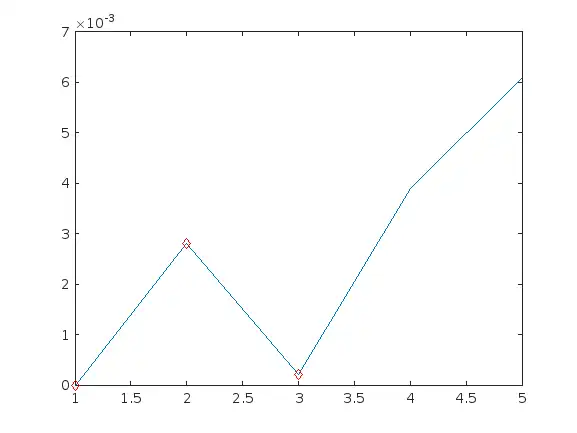
I have a vector of datas. Like this, a =[0;0.0028;0.0002;0.0039;0.0061]. As you see, since the 4° element, the values start growing more until the end. I was trying to determine a threshold to define the 4° and 5° elements as ouliers using 'isoutlier' function from Matlab. I did it. But I had to define a fixed 'ThresholdFactor'value using one of the methods the function has. I would like the 4° and 5° values to being identified as outliers. Not based with all the vector datas, but because they are bigger than the 1°, 2° and 3° elements. I mean, I would like to find the outliers based on the backforward datas [0;0.0028;0.0002]. The vector I posted is an example. The size must be generic. Can you help me? P.S. (Actualized): As I said, depending of the data entries, my vectors gonna have different sizes. But in all cases, the phenomenum they represent, makes the vector values would be bigger at the end. I can't find a way to define when the datas gonna be outliers since the vector will not always be the same. I need to generalize. So what I really need is to identify when the values start growing until reach the end. For instance, for my example, it would happen from the 4° position.
Expert Answer

John Williams
PhD Expert
Answered Oct 3, 2026
hello
why not using islocalmin ? seems to me what you want is to keep the first 3 points (corresponding to a local min).
a =[0;0.0028;0.0002;0.0039;0.0061];
id = find(islocalmin(a(1:end)));
a_keep = a(1:id)
a_keep = 3×1
         0
    0.0028
    0.0002
plot(a)
hold on
plot(a_keep,'dr')
100% Run Guarantee
3-Hour Fast-Track Delivery
Need a Custom Version or Complete Simulation for This Problem?
Our 500+ PhD engineers build, debug, and optimize working MATLAB scripts and Simulink (.slx) models tailored to your exact assignment rubrics with zero plagiarism.
Tested on MATLAB R2024b / R2026a
Turnitin 0% Plagiarism Report
Free 7-Day Revisions Guarantee
Have a different question? Ask here
Related isoutlier Questions & Solutions
Browse All →
Explore similar technical troubleshooting questions and verified MATLAB solutions:
Ready-to-Run MATLAB & Simulink Projects
Browse All Projects →