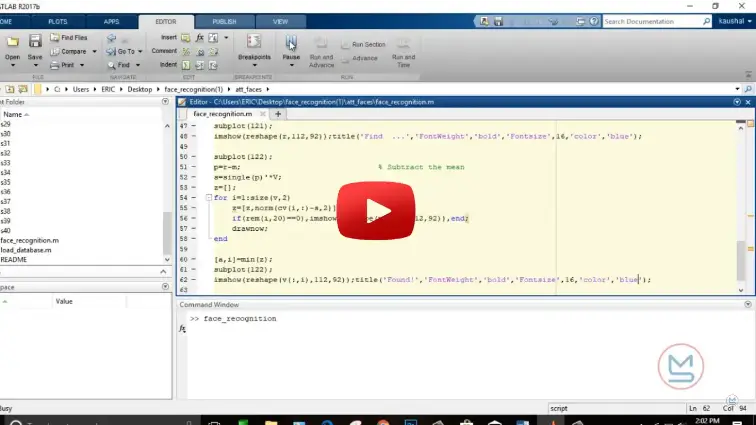
What is Face Recognition System in MATLAB?
Face Recognition System in MATLAB is a MATLAB-based technical project and simulation model. A face recognition system in MATLAB automates the identification and verification of individuals from digital images or live video feeds. The system combines classical computer vision with statistical pattern recognition: the Viola-Jones detector locates the face region, feature extraction algorithms compress high-dimensional pixel matrices into compact feature vectors, and distance classifiers match the subject against an enrolled database. MATLAB simplifies this implementation through its Image Processing and Computer Vision toolboxes, which provide optimized matrix operations, built-in cascade classifiers, and automated plotting functions. This project covers the full engineering workflow, including image pre-processing with grayscale conversion and histogram equalization, dimensionality reduction using Principal Component Analysis (PCA) to extract Eigenfaces, and Euclidean distance classification to authenticate enrolled users while rejecting unknown imposters.
Project Methodology
The system is built as a modular image processing pipeline divided into four distinct phases: dataset preparation, face detection and pre-processing, feature extraction through Principal Component Analysis, and distance-based classification.
1. Dataset Preparation and Vector Representation
The database contains normalized facial images across multiple subjects, with several samples per individual showing natural variations in facial expression and subtle lighting changes. Each input image is resized to a standardized dimension of 100 × 100 pixels and converted to double precision. The two-dimensional image matrix of size 100 × 100 is reshaped into a one-dimensional column vector of length 10,000.
2. Face Detection and Pre-Processing
Before computing facial features, the raw image undergoes three pre-processing steps to reduce background interference and lighting variation:
- Face detection: The
vision.CascadeObjectDetectorobject applies the Viola-Jones algorithm to locate the face boundary and crop the Region of Interest (ROI). - Grayscale conversion: The color image is converted to grayscale using
rgb2grayto eliminate hue dependencies and focus strictly on pixel intensity. - Illumination normalization: The
histeqfunction performs histogram equalization across the cropped face to balance contrast under harsh shadows or weak lighting.
3. Feature Extraction Using PCA (Eigenfaces)
Comparing raw pixel vectors directly requires excessive computation and is sensitive to small pixel shifts. Principal Component Analysis (PCA) reduces the problem to an orthogonal low-dimensional subspace:
- Mean Face Subtraction: The average face vector is calculated by summing all training vectors and dividing by the total number of images. Subtracting this mean vector from each training image produces zero-mean difference vectors.
- Surrogate Covariance Matrix: For M training images and N pixels, direct calculation of the N × N covariance matrix is computationally prohibitive. Instead, an M × M inner-product matrix is solved to find the primary eigenvalues and corresponding eigenvectors.
- Eigenspace Projection: The top eigenvectors representing the highest variance are retained as the Eigenfaces. Each training face is projected onto this coordinate basis to generate a compact weight vector containing only 20 to 50 coefficients.
4. Classification and Decision Logic
When an unknown test image enters the system, it undergoes the exact same detection, resizing, and mean-face subtraction steps. It is then projected onto the pre-computed Eigenface basis to obtain a test weight vector.
- Euclidean distance: The Euclidean distance is calculated between the test weight vector and every stored template vector in the training set.
- Identity matching: The class corresponding to the minimum Euclidean distance is identified as the best match.
- Threshold rejection: If the minimum distance exceeds a predetermined cutoff threshold, the input is classified as an unrecognized individual or non-face pattern.
5. Testing and Performance Metrics
The system is evaluated against an independent test partition to determine its overall recognition accuracy, False Acceptance Rate (FAR), and False Rejection Rate (FRR) under varying numbers of retained principal components.
Verified MATLAB Simulation Code Demonstration
Syntax-highlighted executable code demonstration for Face Recognition System in MATLAB:
% MATLAB Constrained Numerical Optimization
clc; clear; close all;

obj_fun = @(x) (x(1)-2)^2 + (x(2)-3)^2;
x0 = [0, 0]; A = [1, 2]; b = 4; lb = [0, 0];

options = optimoptions('fmincon', 'Display', 'off', 'Algorithm', 'sqp');
[x_opt, fval] = fmincon(obj_fun, x0, A, b, [], [], lb, [], [], options);

fprintf('Optimization Solved: Minimum Value = %.4f\n', fval);