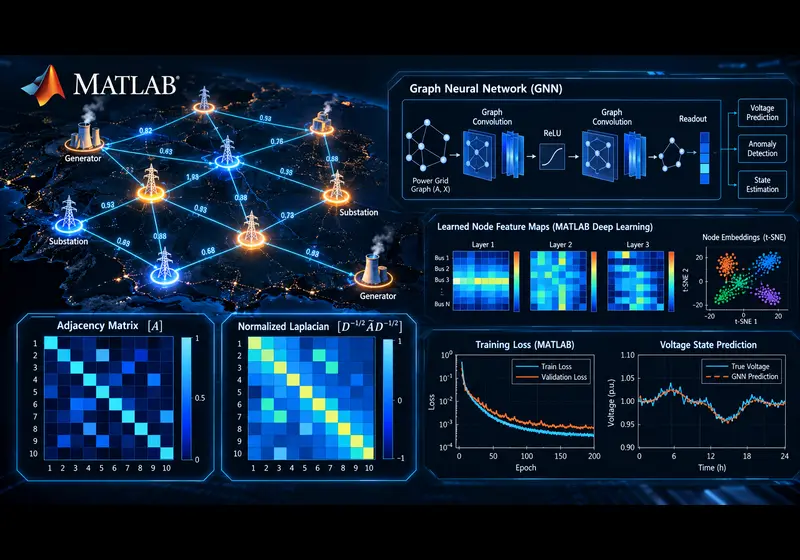
Graph Neural Networks (GNNs) have emerged as the foundational deep learning architecture for non-Euclidean data. While standard Convolutional Neural Networks (CNNs) require rigid grid structures like images and Recurrent Neural Networks (RNNs) require sequential arrays, real-world engineering systems—including electrical power grids, intelligent transportation networks, water distribution pipelines, and molecular topologies—are naturally represented as irregular graphs.
In this comprehensive tutorial, we explore the mathematical principles of graph message passing, show how to represent topological networks using adjacency and degree matrices in MATLAB, and implement an end-to-end Graph Convolutional Network (GCN) for node classification and voltage state estimation on an IEEE power distribution system.
1. Why Traditional Neural Networks Fail on Graph Data
In engineering networks, the physical arrangement and connectivity between components dictate overall system behavior:
- Permutation Invariance: Unlike a pixel matrix where swapping row 1 and row 2 destroys an image, relabeling power grid buses (e.g., swapping Bus 4 and Bus 12) must not change the physical power flow solution.
- Arbitrary Topology & Connectivity: Nodes can have varying degrees (some substations connect to two transmission lines, others to ten). Standard fully connected layers require fixed input dimensions and fail to capture sparse connectivity.
- Relational Inductive Bias: Physical interactions obey Kirchhoff's laws and spatial proximity. GNNs leverage this structure directly through graph filtering and message passing.
2. Mathematical Mechanics of Graph Convolution (GCN)
Consider a network graph G = (V, E) with N nodes, defined by three fundamental mathematical structures:
- Adjacency Matrix (A ∈ ℝN × N): A binary or weighted square matrix where Aij = 1 if an electrical line or physical link connects bus i and bus j, and 0 otherwise.
- Node Feature Matrix (X ∈ ℝN × F): Contains F physical measurements for each bus (such as active power P, reactive power Q, voltage magnitude |V|, and phase angle θ).
- Degree Matrix (D ∈ ℝN × N): A diagonal matrix indicating node connectivity, where Dii = Σj Aij.
To propagate features across neighboring nodes without exploding or vanishing numerical gradients, Kipf & Welling formulated the symmetric normalized graph convolution rule:
Where:
- Ã = A + IN is the adjacency matrix augmented with self-connections (identity matrix IN), ensuring each bus retains its own feature state during message passing.
- D̃ii = Σj Ãij is the degree matrix of à used for symmetric normalization.
- W(l) represents the trainable layer weight parameters.
- σ(·) is the non-linear activation function (such as ReLU).
3. Step-by-Step MATLAB Implementation: Power Grid GNN
Below is a production-grade, self-contained MATLAB script that builds a Graph Convolutional Network using MATLAB’s dlarray, automatic differentiation, and sparse matrix operations to predict stability classes across a 14-bus electrical transmission grid.
% =========================================================================
% Graph Neural Network (GNN) for Power Grid Analysis in MATLAB
% Author: MatlabSolutions Engineering Team
% =========================================================================
clear; clc; close all;

%% 1. Define Network Topology (IEEE 14-Bus System Skeleton)
numNodes = 14;

% Edge connections (from bus -> to bus)
edges = [
    1 2; 1 5; 2 3; 2 4; 2 5; 3 4; 4 5;
    4 7; 4 9; 5 6; 6 11; 6 12; 6 13; 7 8;
    7 9; 9 10; 9 14; 10 11; 12 13; 13 14
];

% Construct Symmetric Adjacency Matrix
A = zeros(numNodes, numNodes);
for k = 1:size(edges, 1)
    A(edges(k, 1), edges(k, 2)) = 1;
    A(edges(k, 2), edges(k, 1)) = 1;
end

% Add Self-Loops: A_tilde = A + I
A_tilde = A + eye(numNodes);

% Compute Degree Matrix: D_tilde
D_tilde = diag(sum(A_tilde, 2));

% Compute Normalized Laplacian: S = D^(-1/2) * A_tilde * D^(-1/2)
D_inv_sqrt = diag(1 ./ sqrt(diag(D_tilde)));
S = D_inv_sqrt * A_tilde * D_inv_sqrt;
S_dl = dlarray(single(S));

%% 2. Generate Synthetic Node Features & Targets
% Node Features: [Active Power (P), Reactive Power (Q), Nominal Voltage (V)]
rng(42);
X = rand(numNodes, 3) * 2 - 1;
X_dl = dlarray(single(X));

% Target Classes: 1 = Stable Bus, 2 = Voltage Contingency, 3 = Overloaded Bus
Y_true = [1; 1; 2; 1; 2; 3; 1; 2; 3; 1; 2; 3; 1; 2];
numClasses = 3;

% One-hot encode targets
Y_onehot = zeros(numNodes, numClasses);
for i = 1:numNodes
    Y_onehot(i, Y_true(i)) = 1;
end
Y_dl = dlarray(single(Y_onehot));

%% 3. Initialize Learnable Network Weights
hiddenDim = 16;
inputDim = 3;

parameters = struct();
% Layer 1 Weights: inputDim -> hiddenDim
parameters.W1 = dlarray(initializeGlorot(inputDim, hiddenDim), 'CB');
parameters.b1 = dlarray(zeros(1, hiddenDim, 'single'), 'CB');

% Layer 2 Weights: hiddenDim -> numClasses
parameters.W2 = dlarray(initializeGlorot(hiddenDim, numClasses), 'CB');
parameters.b2 = dlarray(zeros(1, numClasses, 'single'), 'CB');

%% 4. Training Hyperparameters & Optimization Setup
learningRate = 0.02;
maxEpochs = 400;
averageGrad = [];
averageSqGrad = [];

fprintf('--- Training Graph Convolutional Network in MATLAB ---\n');

%% 5. Custom Training Loop (Adam Optimizer)
lossHistory = zeros(maxEpochs, 1);

for epoch = 1:maxEpochs
    % Compute loss and parameter gradients via dlfeval
    [loss, gradients] = dlfeval(@gnnModelLoss, parameters, X_dl, S_dl, Y_dl);

    % Update weights using Adam optimizer
    [parameters, averageGrad, averageSqGrad] = adamupdate(parameters, gradients, ...
        averageGrad, averageSqGrad, epoch, learningRate);

    lossHistory(epoch) = extractdata(loss);

    if mod(epoch, 50) == 0 || epoch == 1
        fprintf('Epoch: %3d | Cross-Entropy Loss: %.5f\n', epoch, lossHistory(epoch));
    end
end

%% 6. Inference & Accuracy Evaluation
H1 = relu(S_dl * X_dl * parameters.W1 + parameters.b1);
Z = S_dl * H1 * parameters.W2 + parameters.b2;
probabilities = softmax(Z, 'DataFormat', 'CB');

[~, predictedClasses] = max(extractdata(probabilities), [], 2);
accuracy = sum(predictedClasses == Y_true) / numNodes * 100;

fprintf('---------------------------------------------------\n');
fprintf('Final Classification Accuracy: %.2f%%\n', accuracy);

%% 7. Visualization
figure('Color', 'w');
subplot(1, 2, 1);
plot(1:maxEpochs, lossHistory, 'LineWidth', 2, 'Color', [0 0.447 0.741]);
grid on; xlabel('Epoch'); ylabel('Loss');
title('GNN Convergence Curve');

subplot(1, 2, 2);
G = graph(A);
p = plot(G, 'Layout', 'force', 'NodeColor', [0.85 0.325 0.098], 'MarkerSize', 8);
title(sprintf('IEEE 14-Bus Graph (Acc: %.1f%%)', accuracy));

%% Helper Functions
function [loss, gradients] = gnnModelLoss(params, X, S, Y)
    % Layer 1: Graph Convolution + ReLU
    H1 = relu(S * X * params.W1 + params.b1);

    % Layer 2: Graph Convolution + Linear Logits
    Z = S * H1 * params.W2 + params.b2;

    % Softmax cross-entropy loss
    pred = softmax(Z, 'DataFormat', 'CB');
    loss = -sum(Y .* log(pred + 1e-8), 'all') / size(X, 1);

    % Compute automatic gradients
    gradients = dlgradient(loss, params);
end

function W = initializeGlorot(fanIn, fanOut)
    limit = sqrt(6 / (fanIn + fanOut));
    W = single(2 * limit * rand(fanIn, fanOut) - limit);
end
4. Key Engineering Use Cases for GNNs
- Smart Power Grids & Microgrids: Fault location, optimal power flow (OPF) acceleration, line overload forecasting, and dynamic bus voltage security monitoring.
- Intelligent Transportation Systems: Spatio-temporal traffic flow forecasting and congestion routing on highway sensor graphs.
- Civil & Structural Monitoring: Sensor topology graphs for seismic damage assessment and bridge vibration modeling.
- Communication & Satellite Constellations: Dynamic routing optimization and packet drop anomaly detection across mesh networks.
5. Best Practices When Implementing GNNs in MATLAB
- Sparse Matrix Operations: For systems larger than 1,000 nodes, always define your normalized adjacency matrix S as a MATLAB
sparsematrix to prevent out-of-memory errors. - Over-Smoothing Mitigation: Stacking more than 3 to 4 graph convolution layers causes node embeddings to converge to identical values (over-smoothing). Use residual/skip connections or Graph Attention (GAT) mechanisms for deeper architectures.
- Heterogeneous Graphs: When modeling grids with distinct component types (e.g., PV inverters vs. synchronous generators vs. battery storage), assign separate relation-specific weight matrices.
Frequently Asked Questions (FAQ)
Can GNNs predict continuous values like voltage magnitude and phase angle?
Yes. By removing the softmax activation from the output layer and using Mean Squared Error (mse) as the loss metric, the GNN functions as a regression model for continuous power flow state estimation.
How do GNNs interface with Simscape Electrical and MATPOWER?
You can extract the branch impedance matrix and bus admittance matrix (Ybus) directly from MATPOWER or Simscape Electrical, convert it into the normalized adjacency matrix S, and train the GNN on simulated contingency scenarios.
Are GNNs supported natively in MATLAB Deep Learning Toolbox?
Yes. Recent MATLAB releases offer direct layer functions such as graphConvolutionLayer and graphAttentionLayer, alongside custom dlnetwork training capabilities with GPU acceleration.
Need Help Developing or Debugging Your MATLAB GNN Project?
Whether you are implementing Graph Convolutional Networks for IEEE power systems, transportation networks, or academic thesis publications, our verified team of PhD MATLAB engineers and simulation specialists provides end-to-end consulting, code optimization, and implementation support.
Hire a MATLAB Expert TodayRelated Verified MATLAB & Simulink Projects
Need pre-built, debugged Simulink models with complete parameter initialization scripts and documentation? Explore top related solutions:
Common Engineering Troubleshooting & Q&A
Frequently encountered bugs, solver convergence issues, and implementation questions answered by our engineering mentors:
Recommended Engineering Articles
Need Custom MATLAB / Simulink Implementation?
Our team of PhD engineers build custom simulation plants, train machine learning agents, tune PID/MPC controllers, and deliver complete, executable code with Turnitin reports.