1. The 2026 Classroom Reality: Why Professors Are Cracking Down
Walk into an engineering computer lab at Georgia Tech, Purdue, or MIT this semester, and you will notice a distinct change in how controls and simulation courses are run. After two years of students turning in homework generated by ChatGPT, professors have adjusted their grading strategies. At several top institutions, exams have returned to handwritten code on paper, and capstone presentations now require live, unscripted oral defenses where students must explain individual block configurations inside Simulink.
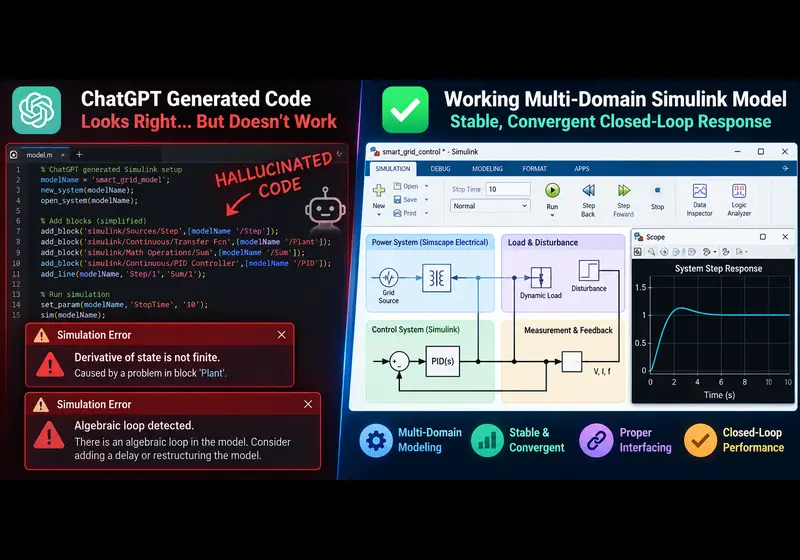
The reason for this pushback is practical: large language models can write standalone Python scripts or basic MATLAB matrix operations, but they struggle with graphical, continuous-time simulation environments. When students prompt an LLM to build a Simulink model for a DC motor drive, a grid-tied inverter, or an electric vehicle battery management system, the generated instructions often break the moment the student hits the Run button in MATLAB.
2. Four Technical Reasons ChatGPT Fails at Simulink
To understand why conversational AI fails at Model-Based Design, you have to look at how Simulink computes system dynamics versus how language models generate text.
Reason 1: Graph Topology vs. Sequential Text Tokens
Language models process information as linear strings of text. A Simulink model, by contrast, is a multi-dimensional directed acyclic graph (DAG). In a real simulation, signal lines carry vector dimensions, sample times, and specific data types across nested subsystems.
When an LLM attempts to instruct a student on constructing a model, or tries to write a programmatic model script using add_block and add_line, it consistently misroutes connections. It connects continuous signals directly into discrete sample-and-hold blocks without rate transitions, or attempts to bridge signal-flow lines into Simscape physical conserving ports without appropriate Sensor or Actuator interface blocks. In Simscape, connections must satisfy physical conservation laws (Kirchhoff's current law or Newton's third law); an LLM does not compute physical conservation, it merely predicts word associations.
Reason 2: Numerical Solver Stiff Dynamics and Chattering
Most AI prompts default to standard solvers like ode45 (Dormand-Prince). However, real-world engineering models in power electronics, hydraulics, and mechanical contact mechanics are mathematically stiff. The system contains state variables changing across drastically different time scales - such as microsecond IGBT switching transients coupled to second-scale thermal dynamics.
When an AI-suggested model runs on ode45, the solver step size shrinks toward zero trying to resolve the steep derivative. The simulation freezes, memory fills, and MATLAB throws the familiar diagnostic:
Derivative of state 'x' in block 'model/Plant/Integrator' at time t=0.0024 is not finite.
Simulation stopped. Consider using an implicit solver such as ode15s or ode23t.
ChatGPT does not analyze eigenvalues or Jacobian condition numbers. It cannot tell you whether your plant has high-frequency poles that demand a trapezoidal or Gear-based numerical solver.
Reason 3: The Unresolved Algebraic Loop
An algebraic loop occurs when an input signal to a block depends directly on the output of that same block at the current time step without any dynamic state delay. A common example is a feedback loop connecting a Sum block directly through a static Gain block into a nonlinear saturation block.
When a student builds a control diagram from an AI text prompt, the AI frequently omits the necessary integration step or unit delay (1/z). When Simulink runs, its internal Newton-Raphson loop solver fails to converge within the maximum iteration limit, generating an immediate halting error:
Cannot solve algebraic loop containing 'model/Subsystem/Sum1' at time 0.0.
Simulink detected a loop with algebraic constraints that cannot be resolved.
Reason 4: Hallucinated Block Masks and Deprecated Parameters
Modern MATLAB releases (including R2025b and R2026a) frequently update toolbox architectures, deprecate older blocks, and restructure block mask dialogs. ChatGPT models frequently reference parameters from obsolete blocksets or invent non-existent properties for the set_param command. A student attempting to automate a model based on AI suggestions often spends hours debugging parameter names that never existed in the official MathWorks documentation.
3. What Professors and ABET Evaluators Expect in 2026
If you are submitting a senior capstone, a master's thesis, or a graded simulation assignment, superficial model diagrams will not pass review. Faculty rubrics in 2026 focus on verification, repeatability, and engineering justification:
- Dedicated Parameter Initialization Scripts: Never hardcode static numbers directly into block dialog boxes. Your model should rely on a clean MATLAB script (such as
init_params.m) that populates the base workspace with physical constants, motor inductances, resistance values, and controller gains. - Formal Solver Justification: You must be prepared to state why your model uses a variable-step solver (like
ode15sfor stiff electrical systems) during rapid prototyping, versus a fixed-step solver (likeode4Runge-Kutta) for hardware-in-the-loop (HIL) deployment. - Closed-Loop Stability Margins: Demonstrating that your control system works in a nominal simulation is not enough. Reviewers expect Bode plots, phase margins, gain margins, and step-response metrics under parametric uncertainty (such as ±20% load variation).
- Physical Consistency and Unit Management: Models must respect physical laws. Energy cannot appear out of nowhere, and physical domains must balance Through variables (current, force) and Across variables (voltage, velocity).
4. How to Properly Combine AI with Simulink Workflows
AI has clear utility in engineering education, but it is unsuited for spatial block diagrams and graphical wiring. Here is the workflow successful engineering teams use:
Use AI for Mathematical Formulation, Not Block Assembly
Ask language models to help derive state-space matrices, solve symbolic differential equations, or generate transfer function equations from a schematic. Once you have the mathematical representation, manually place and configure the corresponding Simulink blocks yourself.
Structure Your Workspace Cleanly
Use a professional parameter initialization file before starting any simulation. Here is an example of how a clean setup script should look for a permanent magnet synchronous motor (PMSM) drive:
%% PMSM System Parameter Initialization
% Run this script before executing the Simulink model

clear; clc;

% Machine Parameters
Rs = 0.45;               % Stator phase resistance (Ohms)
Ld = 0.0035;             % d-axis inductance (Henries)
Lq = 0.0035;             % q-axis inductance (Henries)
lambda_pm = 0.125;       % Permanent magnet flux linkage (Weber)
Poles = 8;               % Number of magnetic poles
J = 0.0008;              % Rotor inertia (kg*m^2)
B = 0.0001;              % Viscous friction coefficient (N*m*s)

% Inverter and DC Bus Configuration
V_dc = 400;              % DC bus supply voltage (V)
f_sw = 10e3;             % PWM switching frequency (Hz)
T_pwm = 1/f_sw;          % Switching period (s)

% Discrete Control Loop Sample Times
Ts_current = 50e-6;      % Inner current loop sample time (50 microseconds)
Ts_speed = 1e-3;         % Outer speed loop sample time (1 millisecond)

disp('System parameters successfully loaded into Base Workspace.');
5. Final Verification Checklist Before Project Submission
Before submitting your .slx models and technical documentation to your professor or capstone committee, walk through these checks:
- Does the simulation run completely without throwing algebraic loop or step-size warnings in the Diagnostic Viewer?
- Are all input and output signals cleanly labeled and scoped with appropriate physical engineering units?
- Is every block mask parameterized through your workspace initialization script rather than hardcoded magic numbers?
- Have you verified the model's stability limits under varied initial conditions and disturbances?
If you are developing complex senior design capstones - such as electric vehicle powertrain twins, renewable grid synchronization, or deep reinforcement learning control loops - you can review verified architecture models and project guidance at MATLAB Simulink AI Projects and explore curated reference designs at Simulink MATLAB Projects.
Related Verified MATLAB & Simulink Projects
Need pre-built, debugged Simulink models with complete parameter initialization scripts and documentation? Explore top related solutions:
Common Engineering Troubleshooting & Q&A
Frequently encountered bugs, solver convergence issues, and implementation questions answered by our engineering mentors:
Recommended Engineering Articles
Need Custom MATLAB / Simulink Implementation?
Our team of PhD engineers build custom simulation plants, train machine learning agents, tune PID/MPC controllers, and deliver complete, executable code with Turnitin reports.