Question
In Matlab is there any special function to draw arc with user defined radius, points and angle. If it is not there how is it possible to draw a curve in a figure using user defined radius,angles, points etc.
Expert Answer

Kshitij Singh
PhD Expert
Answered Oct 3, 2026
There are no such functions in core MATLAB, but they’re easy enough to write.
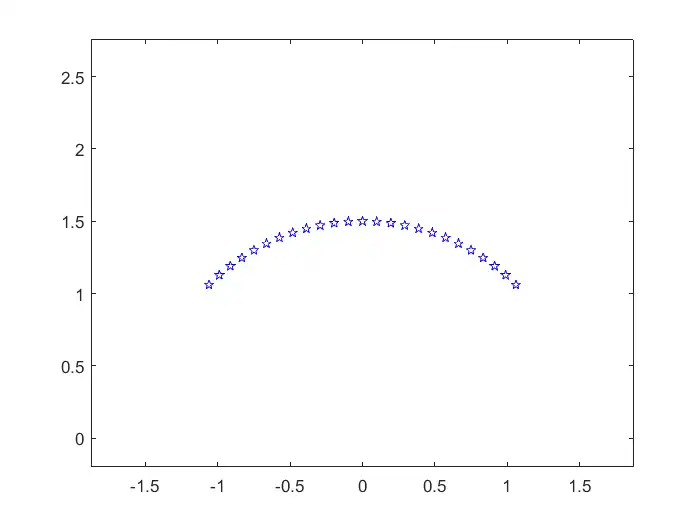
This code plots an arc of stars:
circr = @(radius,rad_ang)  [radius*cos(rad_ang);  radius*sin(rad_ang)];         % Circle Function For Angles In Radians
circd = @(radius,deg_ang)  [radius*cosd(deg_ang);  radius*sind(deg_ang)];       % Circle Function For Angles In Degrees

N = 25;                                                         % Number Of Points In Complete Circle
r_angl = linspace(pi/4, 3*pi/4, N);                             % Angle Defining Arc Segment (radians)
radius = 1.5;                                                   % Arc Radius
xy_r = circr(radius,r_angl);                                    % Matrix (2xN) Of (x,y) Coordinates

figure(1)
plot(xy_r(1,:), xy_r(2,:), 'bp')                                % Draw An Arc Of Blue Stars
axis([-1.25*radius  1.25*radius    0  1.25*radius])             % Set Axis Limits
axis equal                                                      % No Distortion With ‘axis equal’
100% Run Guarantee
3-Hour Fast-Track Delivery
Need a Custom Version or Complete Simulation for This Problem?
Our 500+ PhD engineers build, debug, and optimize working MATLAB scripts and Simulink (.slx) models tailored to your exact assignment rubrics with zero plagiarism.
Tested on MATLAB R2024b / R2026a
Turnitin 0% Plagiarism Report
Free 7-Day Revisions Guarantee
Have a different question? Ask here
Related matlab Questions & Solutions
Browse All →
Explore similar technical troubleshooting questions and verified MATLAB solutions:
Ready-to-Run MATLAB & Simulink Projects
Browse All Projects →