Question
I am trying to create a custom Simscape component. I would like to view the source code for some of the shipped Simscape components as a reference while I create my custom component. How can I view the source code?
Expert Answer

Neeta Dsouza
PhD Expert
Answered Oct 13, 2026
You can view the source code for select blocks in the Simscape family of products. To determine if the source code is available, open the block mask and click on the description tab. If available, a blue hyperlink to the source code will be displayed. See the example below for our “Resistor” block:
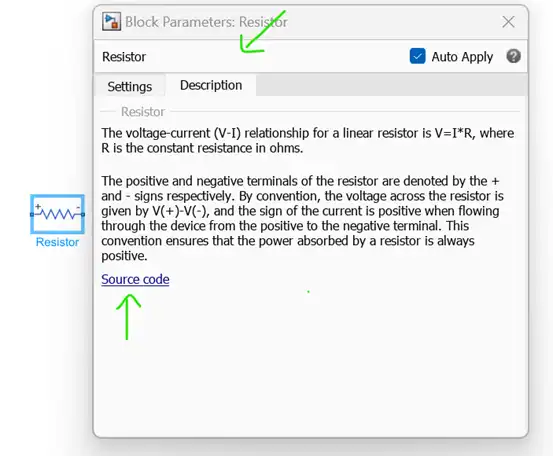
Alternatively, you can search for any piece of Simscape code in your “matlabroot\toolbox\physmod” folder. Note that anything with a .SSC file extension is available to see, but anything with a .SSCP file extension is protected.
100% Run Guarantee
3-Hour Fast-Track Delivery
Need a Custom Version or Complete Simulation for This Problem?
Our 500+ PhD engineers build, debug, and optimize working MATLAB scripts and Simulink (.slx) models tailored to your exact assignment rubrics with zero plagiarism.
Tested on MATLAB R2024b / R2026a
Turnitin 0% Plagiarism Report
Free 7-Day Revisions Guarantee
Have a different question? Ask here
Related ssc Questions & Solutions
Browse All →
Explore similar technical troubleshooting questions and verified MATLAB solutions:
Ready-to-Run MATLAB & Simulink Projects
Browse All Projects →