Question
Hi there, I'm currently working with MATLAB 2017b and using App Designer to develop a simple app. The problem raised when I asked my friend to complete a part of the code on his PC. Everything were working well there but when I tried to open the completed code (.mlapp file) in my version I got the following error: "This app was created in a newer version of App Designer and cannot be opened for editing" Any idea except updating the whole MATLAB to 2018 version, will be greatly helpful!
Expert Answer

John Williams
PhD Expert
Answered Oct 9, 2026
There was a change made between 17b and 18a to the way App Designer saves an app. Your friend on the newer release can
- go to the Save drop down menu in App Designer and select "Save Copy As".
- Inside the save dialog, on the Save As Type drop down, select R2017b and save.
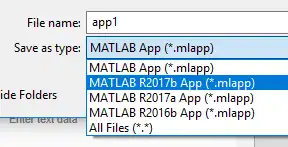
You'll need to repeat this any time he makes a change but this is only for switching back to releases prior to 18a, you wouldn't need to do this if say he were on 18b and you were on 18a. Hope this helps!
100% Run Guarantee
3-Hour Fast-Track Delivery
Need a Custom Version or Complete Simulation for This Problem?
Our 500+ PhD engineers build, debug, and optimize working MATLAB scripts and Simulink (.slx) models tailored to your exact assignment rubrics with zero plagiarism.
Tested on MATLAB R2024b / R2026a
Turnitin 0% Plagiarism Report
Free 7-Day Revisions Guarantee
Have a different question? Ask here
Related app designer Questions & Solutions
Browse All →
Explore similar technical troubleshooting questions and verified MATLAB solutions:
Ready-to-Run MATLAB & Simulink Projects
Browse All Projects →