Question
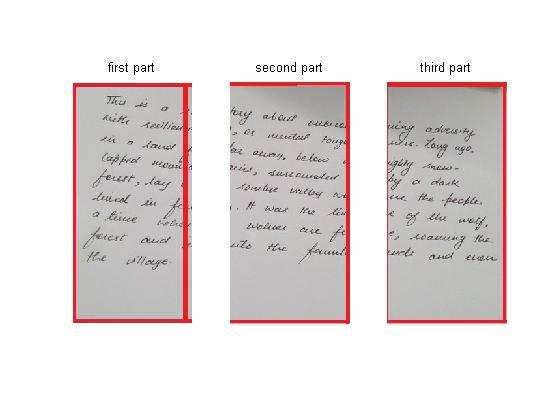
One of the module of my project requires me to divide a page into three parts, and then discard the middle one. Then I have to work with the 1st and the 3rd part? How do I segment my image into three parts?
Expert Answer

Kshitij Singh
PhD Expert
Answered Oct 10, 2026
You didn't provide the actual image but gave a mapped image I used it instead.
Here is the code:
% paper split
img = imread('paper.jpg');
%imshow(img, []);
[nrows ncols dim] = size(img);
% Get the slices colums wise split equally
img1 = img(:,1:ncols/3,:);
img2 = img(:,(ncols/3)+1:2*ncols/3,:);
img3 = img(:,(2*ncols/3)+1:ncols,:);
figure,
subplot(1,3,1), imshow(img1,[]); title('first part');
subplot(1,3,2), imshow(img2,[]); title('second part');
subplot(1,3,3), imshow(img3,[]); title('third part');
100% Run Guarantee
3-Hour Fast-Track Delivery
Need a Custom Version or Complete Simulation for This Problem?
Our 500+ PhD engineers build, debug, and optimize working MATLAB scripts and Simulink (.slx) models tailored to your exact assignment rubrics with zero plagiarism.
Tested on MATLAB R2024b / R2026a
Turnitin 0% Plagiarism Report
Free 7-Day Revisions Guarantee
Have a different question? Ask here
Related matlab Questions & Solutions
Browse All →
Explore similar technical troubleshooting questions and verified MATLAB solutions:
Ready-to-Run MATLAB & Simulink Projects
Browse All Projects →