Question
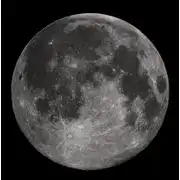
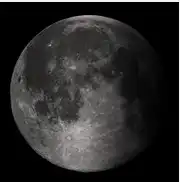
do you know if it's possible to make the transition between two halves of an image less sharp in order to obtain a more soft and realistic effect? I mean something like the image on the left and not the image on the right, which is too artificial and that I have obtained with the code attached below Imm = imread('moon.jpg'); figure imshow(Imm) darken = linspace(0,0,800); darken = repmat(darken,[1085 1 3]); Imm_darken = Imm; Imm_darken(:,1:800,:) = uint8(darken.*single(Imm_darken(:,1:800,:))); figure imshow(Imm_darken) I've tried different tecniques but none of them gives the effect I'm looking for.
Expert Answer

Prashant Kumar
PhD Expert
Answered Oct 10, 2026
you must define the dim factor in a way that is
1.between 0 and 1,
2. it has smooth transition.
for example here in order to make it more realistic, I used a power2 spacing instead of even spacing.
A = imread('luna.bmp'); % read image 'luna.bmp'
figure(1);imshow(A) % show the original image

dim = linspace(0,1,90);
dim = dim.^2; % create a dimming factor ranging from 0 to 1 with power2 spacing.
dim = repmat(dim,[180 1 3]); % repeat this factor for all rows
Adim = A;
Adim(:,180:-1:91,:) = uint8(dim.*single(Adim(:,180:-1:91,:))); % dim the right side of the picture
figure(2);imshow(Adim)
100% Run Guarantee
3-Hour Fast-Track Delivery
Need a Custom Version or Complete Simulation for This Problem?
Our 500+ PhD engineers build, debug, and optimize working MATLAB scripts and Simulink (.slx) models tailored to your exact assignment rubrics with zero plagiarism.
Tested on MATLAB R2024b / R2026a
Turnitin 0% Plagiarism Report
Free 7-Day Revisions Guarantee
Have a different question? Ask here
Related matlab Questions & Solutions
Browse All →
Explore similar technical troubleshooting questions and verified MATLAB solutions:
Ready-to-Run MATLAB & Simulink Projects
Browse All Projects →